

Tarteel Sync
The Quran, prayer times and the Qibla on your Wear OS watch. A phone app comes later.
Free on Google Play.

Screenshots
Real screens.
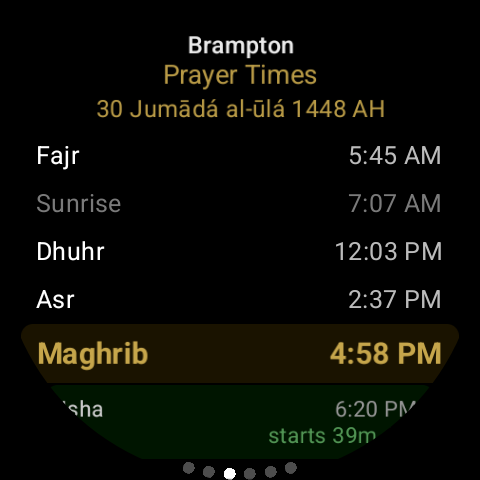
Real captures of Tarteel Sync on a Wear OS watch, never simulated.
Features
What it does.
Tarteel Sync brings the Quran, prayer times and the Qibla to your Wear OS watch. It runs on the watch on its own: no phone app is needed. Read all 114 surahs in Arabic from the first launch, even offline, see today’s prayer times with optional alerts, find the Qibla, and keep duas and adhkar on your wrist. No ads and no account. A Tarteel Sync phone app will join the same Google Play listing later.
The Quran on your wrist
All 114 surahs in Arabic script, right from the first launch and without an internet connection: the text is built into the app. Scroll with the watch’s crown or bezel, move from one surah to the next, and star verses to save them. Quran text from the Tanzil Project (tanzil.net).
Prayer times and alerts
Daily prayer times for your location, with a choice of calculation method (ISNA, Muslim World League, Egyptian General Authority, Umm al-Qura, Karachi) and Asr school. Optional alerts 15 minutes before and at each prayer, and an optional Qiyam al-Layl reminder. The last times are kept for when you are offline.
Next prayer on your watch face
Add the next-prayer complication to your watch face to see the coming prayer at a glance.
Qibla compass
A compass that points towards the Kaaba, corrected for magnetic declination, with your bearing and distance to Mecca.
Duas and adhkar
Morning, evening and after-salah adhkar and other duas, in Arabic with an English translation and source.
Bookmarks
All your starred verses in one list. Tap one to open it in the reader.
Private by design
No ads, no account, no analytics and no tracking. Use the watch’s location or choose a city. For prayer times, only your location rounded to about 1 km leaves the watch.
Get started
Up and running in 3 steps.
Install it on your watch
Get Tarteel Sync from the Play Store on your watch, or from Google Play on your phone or computer.
Start reading
The Quran opens at once, with no sign-in and no permission prompt.
Set your location
For prayer times and the Qibla, allow location when you tap Enable location, or choose a city instead.
A Wear OS watch (Wear OS 3 or later). No phone app is needed.
Support
Help & FAQ.
Still stuck? Email support@northglance.com and mention Tarteel Sync.
Tarteel Sync privacy policyWhat the app accesses and why, in plain wordsDoes it work without an internet connection?
Yes for the Quran, bookmarks, duas and the Qibla. Prayer times come from the AlAdhan service, and the last times are kept, so they still show when you are offline.
Do I need a phone app?
No. Tarteel Sync runs on the watch on its own. A Tarteel Sync phone app will join the same Google Play listing later.
What does it do with my location?
Location is optional: you can choose a city instead. The Qibla is worked out on the watch. For prayer times, your location is rounded to about 1 km before it is sent to the AlAdhan service. The Quran, bookmarks and duas need no location at all.
How do I delete my data?
Everything stays on your watch. Uninstall Tarteel Sync, or clear its storage in the watch’s settings. We hold no copy and there is no account.
Quran text from the Tanzil Project (tanzil.net). Tarteel Sync is an independent app and is not affiliated with or endorsed by Google.