

Azivane
A compass for your Wear OS watch, with your heading on the watch face. Coming to Android phones too.
Free. Azivane Pro is an optional one-time purchase in the app.

Screenshots
Real screens.
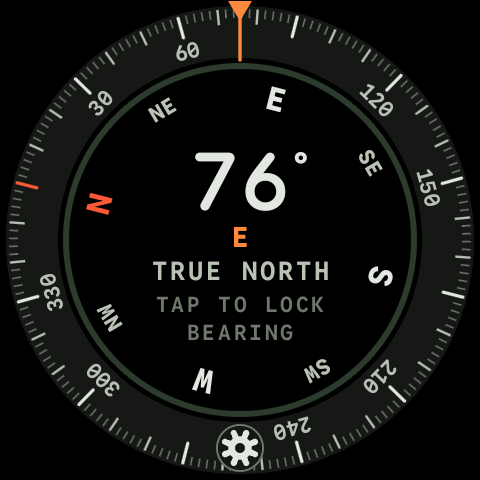
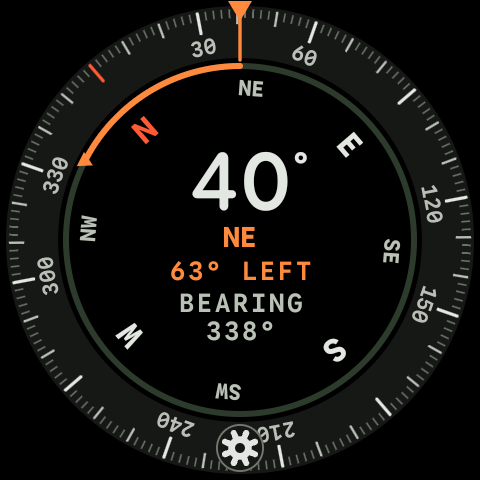
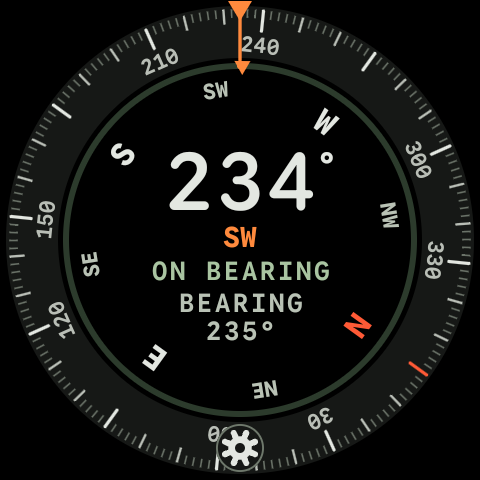
Real captures of Azivane on a Wear OS watch, never simulated.
Features
What it does.
Azivane is a compass for Wear OS watches. Open it for a full-screen dial that turns smoothly as you turn, and lock a bearing with one tap. Add the Compass heading complication to see your heading on the watch face, live as you turn while the screen is on. The Qibla direction is free. Azivane Pro, an optional one-time purchase, adds sun and moon, saved bearings, a night dial, a Qibla complication and a compass tile. A full Azivane compass for Android phones is coming soon too, in the same Google Play listing.
A dial that reads at a glance
Your heading in large numbers, its direction below, a tick every 2 degrees and a fixed pointer at the top. The dial glides as you turn.
Feel your direction
A light tick at every 30 degrees and a firmer click at north. Tap to lock a bearing: Azivane shows how many degrees to turn left or right to get back on it, and a double click tells you when you are there.
On your watch face
The Compass heading complication shows your heading, for example 304° NW, and follows you as you turn while the screen is on. It runs while Azivane’s notifications are allowed, and a silent notification in your watch’s notification list shows that it is running.
Qibla, free
Turn it on in Settings > Qibla: a green mark on the dial shows the direction of the Kaaba in Mecca, its bearing shows under your heading, and FACING QIBLA appears when you face it. It uses your approximate location, only on the watch.
Azivane Pro
An optional one-time purchase through Google Play, no subscription: a Qibla complication and a soft buzz when you face the Qibla, sun and moon marks with rise and set times, saved bearings with one-tap back-bearing, a red night dial and a compass tile. Everything else stays free.
Honest north, private by design
With location allowed it points to true north, using your approximate location only on the watch. Without it, it shows magnetic north and says so on the compass screen. No internet permission, no account, no ads.
Get started
Up and running in 3 steps.
Install it on your watch
Get Azivane from the Play Store on your watch, or from Google Play on your phone or computer.
Open the compass
Allow approximate location if you want true north. You can say no and use magnetic north. Then allow notifications, so the heading on your watch face stays live.
Add it to your watch face
Touch and hold your watch face, edit it and choose Compass heading for a complication. It follows you as you turn while the screen is on.
Now: a Wear OS watch (Wear OS 3 or later) with a compass sensor; no phone app is needed. Coming soon: Azivane for Android phones (Android 11 or later), which works on its own.
Support
Help & FAQ.
Still stuck? Email support@northglance.com and mention Azivane.
Azivane privacy policyWhat the app accesses and why, in plain wordsIs there a phone version?
Yes, coming soon. Azivane for Android phones is a full compass in the same Google Play listing: true north from your approximate location, tap to lock a bearing, an optional Qibla direction and a level. It works on its own, with or without the watch. Until then, Azivane runs on your Wear OS watch by itself.
What does Azivane Pro add?
A Qibla complication for your watch face and a soft buzz when you turn to face the Qibla, sun and moon marks with today’s rise and set times, saved bearings with a one-tap back-bearing, a red night dial and a compass tile. It is a one-time purchase through Google Play, with no subscription, and Settings > Restore purchase brings it back on the same Google account. The compass, the watch face complication, the bearing lock and the Qibla mark stay free.
Why does it say magnetic north?
Azivane has no location yet, so it cannot correct for magnetic declination. Allow approximate location in Azivane’s settings. If it is already allowed, turn on Location in your watch’s settings. Azivane points to true north once the watch has a location.
Why is there a Live heading is on
notification?
It shows in your watch’s notification list while live heading keeps the Compass heading complication up to date, so you can see that it is running. It is silent, and nothing is added to your watch face. Tap it to open Azivane’s settings. To stop live heading, tap Live heading on watch face
there and turn off its notifications.
Why does the complication say LAST?
Azivane’s notifications are not allowed, so live heading cannot run and the complication shows the last heading Azivane read. Open Azivane’s settings and tap Live heading on watch face
to allow them.
The heading looks wrong.
If Azivane asks you to move your watch in a figure 8, do that to calibrate the sensor. Magnets, metal and other electronics nearby can pull the reading off.
How do I delete my data?
Uninstall Azivane, or clear its storage in your watch’s settings. Azivane keeps nothing anywhere else. If you bought Azivane Pro, your purchase stays with your Google account, and the order records we receive are described in the privacy policy.
Azivane is an independent app and is not affiliated with or endorsed by Google.